blog / · updated · 16 min read
My local Kubernetes cluster in one command
A short introduction to Kubernetes, how to bring up a local cluster with kind or k3d and switch between clusters, and the two bootstrap scripts I use to get a full lab with Argo CD in one command.
In the Wazuh intro I promised a series where we deploy Wazuh on Kubernetes, entirely as code. Before getting there, it makes sense to explain what Kubernetes is and how to get a cluster on your laptop to play with. This post covers both. It starts by hand, with one-line clusters in kind and k3d and how to point kubectl at each one, and ends with the two bootstrap scripts I reach for every time I want a full lab.
What Kubernetes is
Kubernetes (often shortened to K8s) is an open source system that runs containers across a group of machines and keeps them running. Google open-sourced it in 2014, building on what it had learned from Borg, its internal cluster manager. Today it’s hosted by the Cloud Native Computing Foundation (CNCF).
A handful of terms show up everywhere, so here they are.
| Term | What it means |
|---|---|
| Cluster | The whole thing, a set of machines managed as one |
| Node | One machine in the cluster, physical or virtual |
| Control plane | The components that run the cluster, including the API server, the scheduler and etcd, the database where the cluster keeps its state |
| Pod | The smallest unit Kubernetes runs, one or more containers sharing a network address |
| Manifest | A YAML file describing something you want in the cluster, such as a Deployment, a Service or a Secret |
| Namespace | A way to group and separate things inside one cluster |
| Helm chart | A package of manifests with variables, the closest thing Kubernetes has to an installer |
What makes Kubernetes different from a script that starts containers is the idea of desired state. You tell the cluster what you want, say three copies of this app with this configuration, and controllers keep comparing that with what’s actually running. If a pod dies, they start another. If a node disappears, they move its pods somewhere else. You describe the result and Kubernetes works out the steps.
That’s also why it fits so well with infrastructure as code, which I covered in What infrastructure as code is. If the state of the cluster is a pile of YAML files, those files can live in Git.
Why a local cluster
The best reason is that you can break it. A managed cluster in the cloud (EKS, AKS or GKE) costs money from the first minute, it’s usually shared with other people, and a bad command has consequences. A local cluster runs on your laptop for free, nobody else depends on it, and when you wreck it you delete it and make a new one.
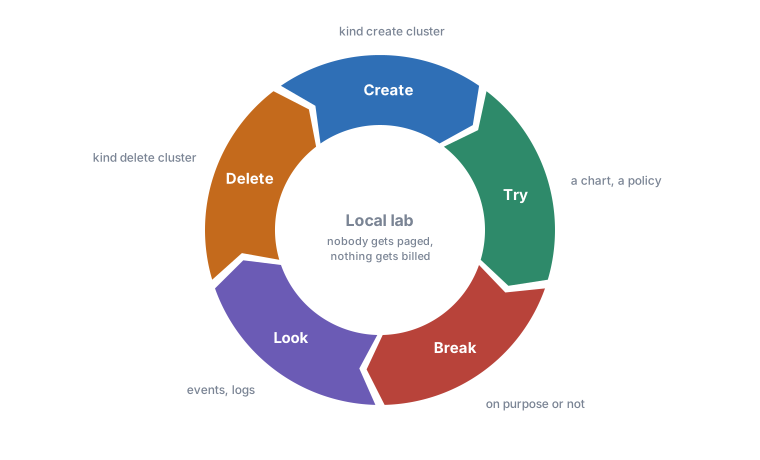
That changes how you learn. You can delete CoreDNS just to see what stops working, apply a Kyverno policy that blocks every pod, upgrade a chart three major versions at once, or stop a node container halfway through a rollout. The worst outcome is a couple of minutes waiting for a fresh cluster. I’d much rather find out what a bad kubectl delete does there than on a cluster with real users.
It’s also where I try a Helm chart before using it for real, test a change to a manifest or follow along with a series like the Wazuh one.
kind or k3d
Both run Kubernetes nodes as Docker containers on your laptop, with each container pretending to be a machine. The difference is what runs inside.
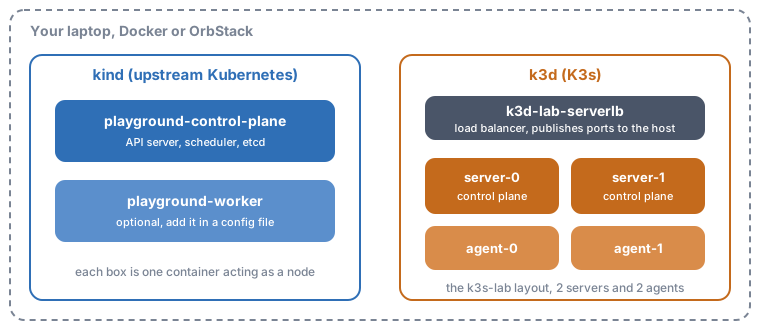
| kind | k3d | |
|---|---|---|
| Kubernetes distribution | Upstream Kubernetes | K3s, a lightweight certified distribution |
| Built-in ingress | None, you install one | Traefik included |
| Publishing ports to your laptop | extraPortMappings in the cluster config | Through the serverlb load balancer container |
| Typical use | Testing manifests, CI, a quick playground | Multi-node labs, more realistic topologies |
If I just want to try a chart, I use kind. If I want a control plane with more than one server, etcd snapshots or several services talking to each other, I use k3d.
Your first cluster by hand
Before any script, it’s worth doing it once by hand. You need Docker running (Docker Desktop, OrbStack or Docker Engine on Linux) and three command-line tools. On macOS or Linux with Homebrew, that’s one line.
brew install kubectl kind k3d
Without Homebrew, kind publishes release binaries, k3d has an install script and the Kubernetes docs cover kubectl for every platform.
kind
kind create cluster --name playground
kubectl get nodes
Without --name the cluster is called kind. On my laptop, with the node image already downloaded, it took about ten seconds. The first run is slower because it pulls the image. You get a single container that acts as the control plane and runs your workloads too.
NAME                       STATUS   ROLES           AGE   VERSION
playground-control-plane   Ready    control-plane   40s   v1.x.y
To list and remove kind clusters, use these.
kind get clusters
kind delete cluster --name playground
k3d
k3d cluster create lab
kubectl get nodes
That gives you one K3s server plus a load balancer container. To get a few nodes, ask for them.
k3d cluster create lab --servers 1 --agents 2
k3d cluster list
k3d cluster delete lab
Break it on purpose
Here’s a first experiment that shows desired state in action. Create a deployment with three copies of nginx, then delete all its pods.
kubectl create deployment hello --image=nginx --replicas=3
kubectl rollout status deployment/hello
kubectl delete pod -l app=hello
kubectl get pods -l app=hello
A few seconds later you have three new pods with different names. The deployment still says three replicas, so the controller replaced them. Try it with --replicas=0, scale it up again, delete the deployment itself, or docker stop one of the node containers in the k3d cluster and watch what happens to its pods. When you get bored, delete the cluster.
Connecting to your clusters
Every kubectl command reads a file called kubeconfig (by default ~/.kube/config) to find out which API server to talk to and which credentials to use. That file holds three kinds of entries.
- Clusters, with the API server address and its CA certificate
- Users, with the credentials, usually a client certificate or a token
- Contexts, each one pairing a cluster with a user and, optionally, a default namespace
One field, current-context, decides where your commands go.
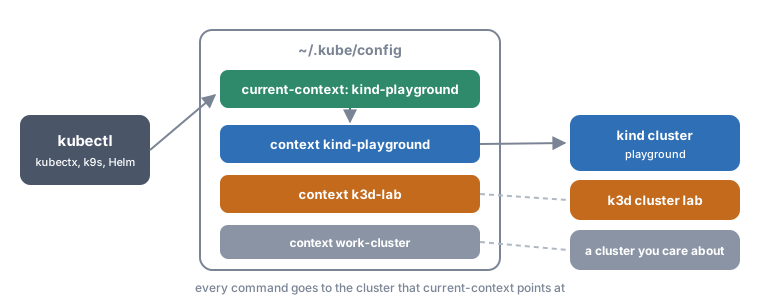
Both tools write to that file when they create a cluster and switch you to the new context straight away. kind names the context kind-<cluster> and k3d names it k3d-<cluster>, so the two clusters above are kind-playground and k3d-lab. That’s why kubectl get nodes worked right after creating them. The catch is that the last cluster you created quietly becomes the active one, and if you also have work clusters in the same file, it’s easy to lose track of where you are.
The kubectl way
Everything you need is under kubectl config.
kubectl config get-contexts              # list contexts, the active one has a *
kubectl config current-context           # print the active context
kubectl config use-context k3d-lab       # switch to another context
kubectl get pods --context kind-playground   # run one command against another context
The default namespace lives in the context too. To stop typing -n argocd all the time, set it on the current context.
kubectl config set-context --current --namespace=argocd
The comfortable way, kubectx and kubens
kubectx is a small tool that does the same with less typing, and it comes with a sibling, kubens, for namespaces. I use both every day.
brew install kubectx      # installs kubectx and kubens

kubectx                   # list contexts, the active one is highlighted
kubectx k3d-lab           # switch
kubectx -                 # go back to the previous context
kubens argocd             # change the default namespace
kubens -                  # back to the previous namespace
If you also have fzf installed, running kubectx or kubens with no arguments opens an interactive picker. The habit I recommend is to run kubectx -c (or keep the context in your shell prompt) before anything destructive. A local lab makes it safe to break things, as long as the command really lands on the local lab.
Bootstrap Argo CD and let Git do the rest
A bare cluster like the ones above looks nothing like a real one. Real clusters have ingress (the entry point that routes HTTP traffic to the right app), certificates, secrets management, monitoring and a repeatable way to deploy things. Setting all that up by hand every time is slow and easy to get wrong, so I automated it. Twice, in fact, because I ended up with two flavours for two different jobs. Both are public on GitHub under the MIT licence.
- kind-bootstrap-script is a quick playground on kind, a cluster called
k8s-playgroundwith one control plane and one worker. - k3d-bootstrap-script is a K3s lab on k3d called
k3s-lab, with two servers, two agents, Vault, monitoring and a demo app. I built it for a lab in my cybersecurity specialisation course.
I wanted the same four things from both.
- One command from zero to a working cluster
- Everything declarative and in Git
- Disposable, so I can delete it and rebuild without fear
- Close enough to production to learn something useful
Both repos rely on Argo CD, so here’s a quick look at what it does.
What Argo CD does
Argo CD is a GitOps tool. GitOps means the desired state of the cluster lives in Git, and an agent running inside the cluster keeps pulling it and applying it. Nobody runs kubectl apply by hand and no CI job pushes changes in. You commit, and the cluster catches up on its own.
The main object is the Application. It says where the manifests come from (a folder in a Git repo, or a Helm chart and its version) and where they go (a cluster and a namespace). This is roughly what one of the files in argocd/ looks like.
apiVersion: argoproj.io/v1alpha1
kind: Application
metadata:
  name: cert-manager
  namespace: argocd
spec:
  project: default
  source:
    repoURL: https://charts.jetstack.io   # where it comes from
    chart: cert-manager
    targetRevision: v1.21.3
  destination:
    server: https://kubernetes.default.svc   # where it goes
    namespace: cert-manager
  syncPolicy:
    automated:
      prune: true      # delete what was removed from Git
      selfHeal: true   # undo manual changes in the cluster
    syncOptions: [CreateNamespace=true]
Argo CD keeps comparing what that source renders with what’s actually running and shows the result as two statuses. Sync status says whether the cluster matches Git (Synced) or has drifted from it (OutOfSync). Health status says whether the resources work, from Healthy through Progressing to Degraded or Missing.
With automated sync, Argo CD applies changes as soon as they land in Git. selfHeal goes a step further and reverts anything changed by hand in the cluster, and prune deletes resources you removed from the repo. Both are off unless you turn them on.
That makes another good thing to break on purpose. Headlamp has selfHeal on in both labs, so delete its deployment and watch Argo CD put it back a few seconds later.
kubectl -n headlamp delete deployment headlamp
kubectl -n headlamp get deployment headlamp -w
Argo CD also comes with a web UI that shows every application, its status and the tree of resources it created. This is the kind playground right after the bootstrap.
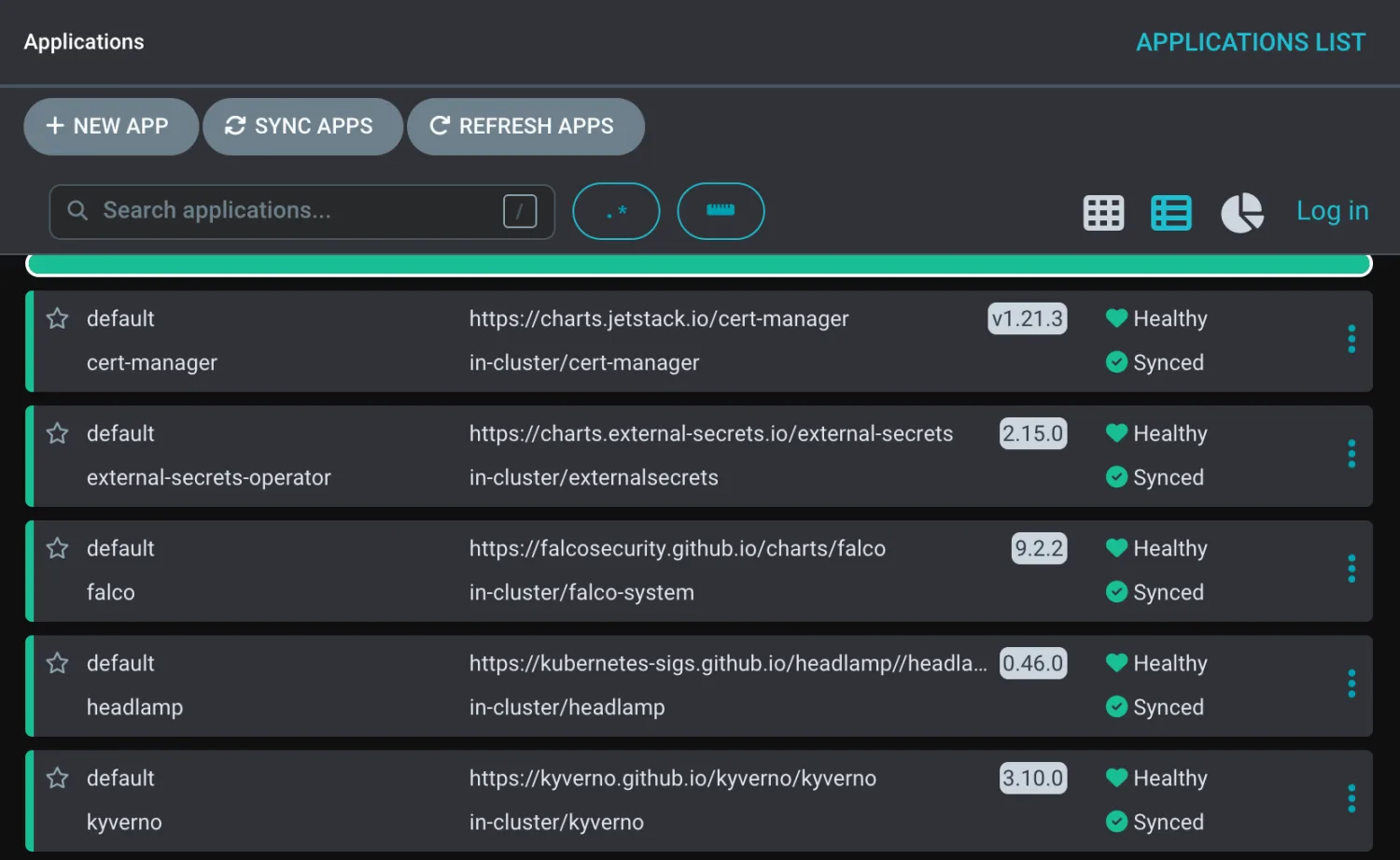 All green. Enjoy it while it lasts.
Click on an application and you get the tree of everything it owns. Here’s Headlamp, with its service, secret, role binding and the deployment down to the running pod. The deployment is two minutes younger than the rest because I’d just deleted it, and Argo CD had already put it back.
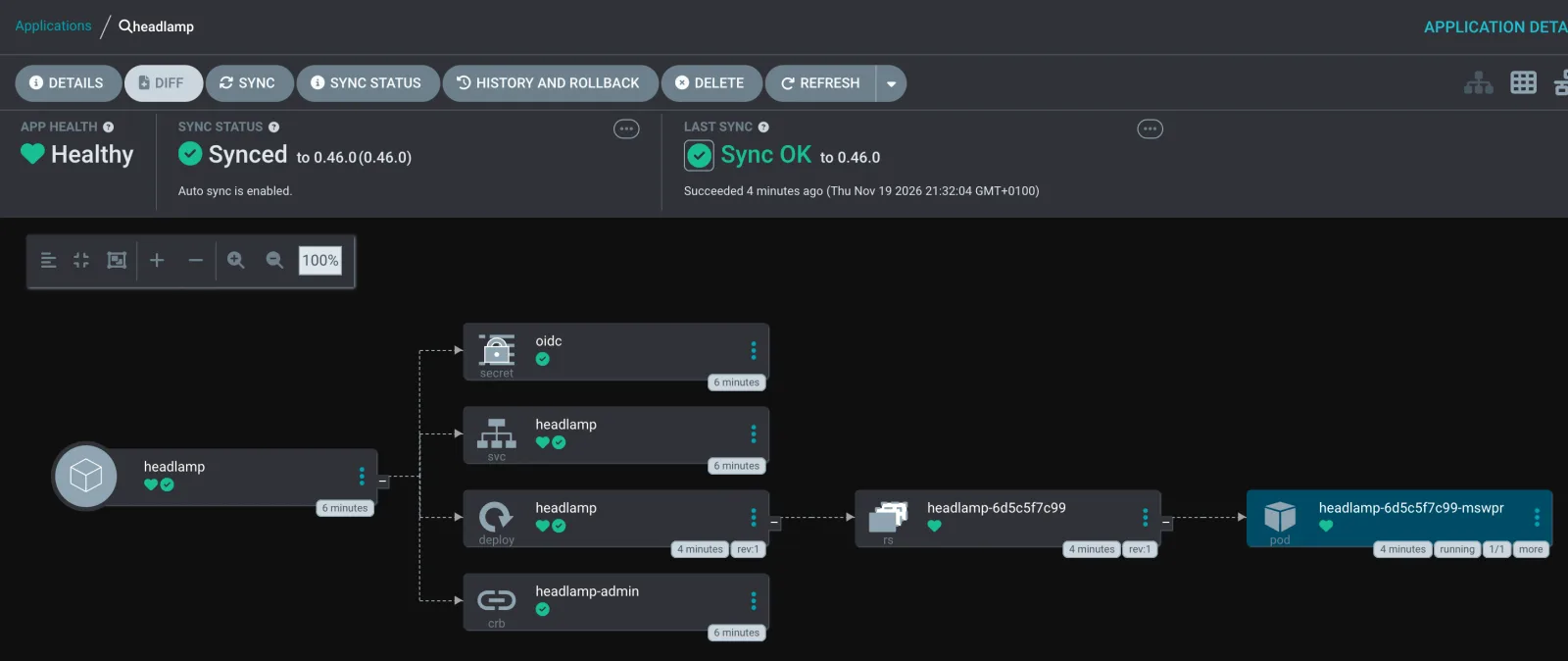 Headlamp, back from the dead and green again before I’d finished typing.
Back to the bootstrap scripts
There’s a lot more to Argo CD (projects, sync waves, the app of apps pattern, ApplicationSets), and it will get a post of its own. For this one, the idea above is enough, so back to the scripts.
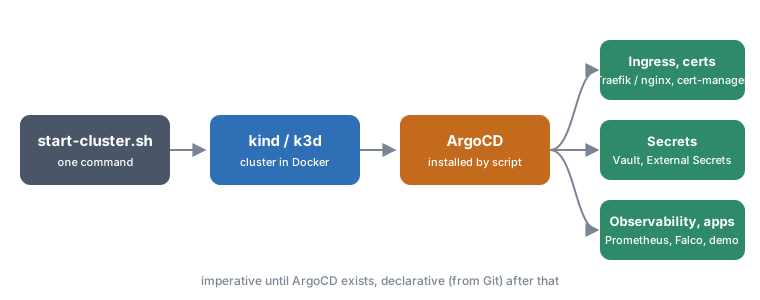
Both repos follow the same steps.
- A script creates the cluster from a config file (
config/kind-config.yamlorconfig/k3d-config.yaml) and switcheskubectlto its context. - The script installs Argo CD from a manifest stored in the repo and waits until all its components are ready. The script has to run this step itself, because Argo CD
Applicationobjects can’t exist before Argo CD does. - The script applies one Argo CD
Applicationper platform component, from theargocd/directory. - From then on, Git is the source of truth. To change the cluster, I change the repo.
So the only fixed part is a basic cluster with Argo CD on top. Everything after that is a list I picked for my own experiments, and you can swap it for whatever you want to learn, whether that’s metrics, operators or your own applications. Empty the apps array and you get a bare cluster with Argo CD, ready for the next thing.
Adding a new component takes two steps. Drop an Application manifest in argocd/ and add its name (the file name without .yaml) to the apps array at the top of start-cluster.sh.
The kind playground
git clone https://github.com/pixelotes/kind-bootstrap-script.git
cd kind-bootstrap-script
./start-cluster.sh    # cluster, Argo CD and every app
./stop-cluster.sh     # delete it all
It installs these by default.
- external-secrets-operator, which syncs secrets from an external store into Kubernetes
- cert-manager, which issues and renews certificates
- metrics-server, so
kubectl topand autoscaling work - Traefik as the ingress controller, since kind ships without one
- Falco, which watches system calls for suspicious behaviour at runtime
- VictoriaMetrics and VictoriaLogs, to store metrics and logs
- Kyverno, a policy engine that can check or block manifests before they reach the cluster
- Headlamp as the cluster UI
The first version of the playground used ingress-nginx and the Kubernetes Dashboard. I swapped both while writing this post. The Kubernetes project retired ingress-nginx in March 2026, so it gets no more releases or security fixes, and the official advice is to move to the Gateway API or another controller. The Kubernetes Dashboard repository is archived, and its README points people to Headlamp.
The kind config publishes a few ports on your laptop, so once Argo CD has finished you get these addresses.
| Service | URL |
|---|---|
| Argo CD | https://localhost:30080 (user admin, self-signed certificate) |
| Headlamp | http://localhost:30090 |
| Your own Ingresses | http://<name>.localhost:8080, through Traefik |
The script prints the Argo CD admin password at the end. With everything running, the two nodes used about 4 GB of memory on my laptop.
The k3d lab
git clone https://github.com/pixelotes/k3d-bootstrap-script.git
cd k3d-bootstrap-script
./start-cluster.sh
Besides Docker, kubectl and k3d, the Vault step needs jq. By default start-cluster.sh does the whole thing. It creates the cluster, installs Argo CD, hands Argo CD five applications and runs the Vault setup at the end.
- Headlamp as the cluster UI
- cert-manager
- kube-prometheus-stack, with Prometheus, Grafana and Alertmanager
- Vault in HA mode, with Raft storage and three replicas
- friendlyhello, a small Flask and Redis demo app deployed from a Helm chart in the same repo, which reads a secret from Vault
Traefik comes with K3s and handles ingress on host port 8080. Once everything is up, these are the addresses.
| Service | URL |
|---|---|
| Argo CD | https://localhost:30080 |
| Headlamp | http://localhost:30090 |
| Grafana | http://grafana.localhost:8080 |
| friendlyhello | http://friendlyhello.localhost:8080 |
In both labs Headlamp logs in by itself with a lab-only service account that has cluster-admin rights. That’s convenient on a laptop and a terrible idea anywhere else.
On a laptop with less memory, empty the apps array and bring things up one by one with deploy.sh. It applies an application and waits until Argo CD reports it as Healthy before it returns, so you see a stuck chart straight away.
./deploy.sh cert-manager
./deploy.sh kube-prometheus-stack
./deploy.sh vault
./scripts/vault-setup.sh    # init, unseal, KV v2, Kubernetes auth, demo secret
./deploy.sh friendlyhello
The same script can also deploy a few extras that aren’t in the default list, like Ollama and Open WebUI.
Vault starts sealed, which means it can’t read its own data until someone unlocks it with the unseal keys. vault-setup.sh initialises it, unseals the three replicas, turns on the KV secrets engine and Kubernetes authentication, and writes a demo secret. After that, the Vault demo is one Git commit away. You set vault.enabled to true in the friendlyhello chart values, commit, and Argo CD redeploys the app with a Vault Agent sidecar (a helper container in the same pod) that fetches the secret. Argo CD watches my repository, so to do this yourself, fork it first and change repoURL in argocd/friendlyhello.yaml to point at your fork.
The lab also covers taking an etcd snapshot of the K3s control plane.
docker exec k3d-k3s-lab-server-0 k3s etcd-snapshot save --name lab-snap \
  --dir /var/lib/rancher/k3s/server/db/snapshots
If you take the topology as a model, keep one detail in mind. Two servers are enough to practise with a multi-server control plane, and high availability needs three. etcd needs a majority of its members to agree, and with two members a majority is both of them, so losing either one stops the cluster. That’s why production control planes use three or five, and k3d prints a warning about it when you create the lab.
Design decisions
I use GitOps even on my laptop. It’s the same workflow I use on real clusters, so I practise it every day and the habits are already there when it matters.
Each Argo CD Application lives in its own file. That makes them easy to read, add and remove, and the file name doubles as the app name in the scripts.
The Argo CD manifest and the chart versions are pinned in the repo. The bootstrap doesn’t download whatever the latest version happens to be that day, so the lab comes up the same way every time. The flip side is that pinned versions get old, and every now and then I have to bump them by hand.
Charts that bring their own CRDs (custom resource definitions, the way a chart teaches Kubernetes new kinds of object), like cert-manager and Prometheus, can fail in creative ways if everything lands at once. Argo CD retries until things settle, and deploy.sh is there for the times I want to watch each step.
Secrets stay out of Git. Vault’s unseal keys and root token go to ~/k3s-lab-vault-init.json, outside the repo. Lose that file and the Vault is gone for good, which is exactly what would happen in production.
What broke along the way
Most of my bootstrap failures were about order. CRDs have to exist before the resources that use them, controllers before their configuration, and Vault has to be unsealed before anything asks it for a secret. Waiting for each piece is slower than firing everything at once and hoping, and it’s far more reliable.
A laptop also has limits. Two servers, two agents, Prometheus and three Vault replicas need a fair amount of memory, so I size the lab to the experiment.
Once rebuilding takes a few minutes, I stop worrying about breaking things, and that’s when a lab gets used.
Next
The next part of the Wazuh series starts from the same pattern, with a kind cluster and Argo CD, and then deploys a whole SIEM from Git. In the meantime, both repos are yours to fork. Change the apps array and make them your own.
Sources
- pixelotes/kind-bootstrap-script
- pixelotes/k3d-bootstrap-script
- Kubernetes documentation: Overview
- Kubernetes documentation: Cluster components
- Kubernetes documentation: Organizing cluster access using kubeconfig files
- Kubernetes documentation: Configure access to multiple clusters
- Kubernetes documentation: Install tools
- Kubernetes blog: Borg, the predecessor to Kubernetes
- Kubernetes blog: Ingress NGINX retirement, what you need to know
- CNCF: Kubernetes project page
- kind: Quick Start
- k3d documentation
- K3s
- ahmetb/kubectx
- Traefik documentation
- Headlamp
- Argo CD documentation
- Argo CD documentation: Core concepts
- Argo CD documentation: Automated sync policy
- Argo CD documentation: Resource health
- kubernetes/dashboard on GitHub (archive notice)
- etcd FAQ: why an odd number of cluster members
- Vault documentation: Seal/Unseal