blog / · updated · 5 min read
Self-Hosting or SaaS: When Is It Worth It?
Self-hosting looks cheaper than a subscription, but it rarely is. What it costs in time and technical debt, when it pays off, and my own cases: Backstage, GLPI, Elastic and OpsDeck.
Every IT team has had this conversation. A SaaS tool costs a few thousand euros a year; there is an open-source alternative you could run yourself for free. Why pay?
My short answer, after doing it many times: it is almost never worth it, unless the tool is very niche, very expensive, or handles data that must stay under your control. What you save in licences, you pay in time and in technical debt.
My own track record is a mixed bag: a few projects that stuck around for years, and a small graveyard of applications that died for all sorts of reasons. Some were too much work to keep alive, some broke with every upgrade, and some simply had no users. The examples below come from both sides.

What self-hosting really costs
The licence is the visible cost. The invisible ones are bigger:
- Installation and integration: SSO, backups, monitoring, TLS, storage, networking.
- Upgrades: security patches, major versions, breaking changes, and the plugins or customisations that break with them.
- Operations: someone who knows how it works, is available when it fails, and is not on holiday.
- Security: you are responsible for hardening, exposure and vulnerabilities.
- Knowledge risk: when the person who set it up leaves, the tool becomes a black box.
- Opportunity cost: every hour spent keeping a tool alive is an hour not spent on what the business needs.
A SaaS subscription bundles all of that into the price.
My own examples
Backstage. I tried to deploy Spotify’s developer portal and even automated its installation. I decided not to put it in production: keeping it healthy needed someone almost full time, and upgrades kept breaking things. For a small IT team, that is a whole person.
GLPI with too many plugins. GLPI itself is great. But as my needs grew, every new need meant another plugin, and every upgrade became a project: check compatibility, wait for the plugins, test, pray. I started postponing upgrades, which is exactly how technical debt begins.
My first SIEM on Elastic. It worked well and ran mostly on its own, but it needed weekly maintenance plus careful upgrades for every new version, reading release notes and breaking changes. Worth it at the time, because a commercial SIEM was out of budget, but not free. My rule for a self-hosted SIEM today: only as infrastructure as code, and even then it has to be kept up to date, which means reserving time for it every sprint (I explain how I do it in my Wazuh as code series, and the repository of that first Elastic SIEM is public; more on maintenance in an upcoming article on technical debt).
Wiki.js for documentation. I tried it as a way to read our documentation, and it never took off: people kept reading the docs where they already were. The lesson: if you self-host something and nobody uses it, it is not worth it, however little it costs to run. Adoption is part of the cost-benefit, and a tool with no users is pure maintenance.
OpsDeck. A caveat first: OpsDeck is my own project, so this is really a build decision rather than self-hosting someone else’s software, and I am obviously biased. Even so, it paid off, through a combination of niche and cost: nothing on the market did exactly what I needed, and the closest equivalents in the enterprise world, ServiceNow-style platforms (with an enormous distance between them, of course), cost a fortune. It also worked because it was designed from the start to be easy to maintain: one codebase, automatic migrations, a Helm chart, backups and emergency exports. That is the exception that proves the rule.
Custom reporting jobs. Also worth it: they were so specific to our needs that no product would ever offer them.
When self-hosting is worth it
- Niche tools with no good SaaS option.
- Very expensive SaaS, where the licence cost clearly exceeds the cost of a person’s time to run the alternative.
- Data that must not leave your infrastructure, by law, contract or risk appetite.
- Integration needs the SaaS cannot meet.
- You already run a platform (Kubernetes, GitOps, monitoring, backups) where one more application adds little marginal cost.
- Learning, in a lab, where breaking things is the point.
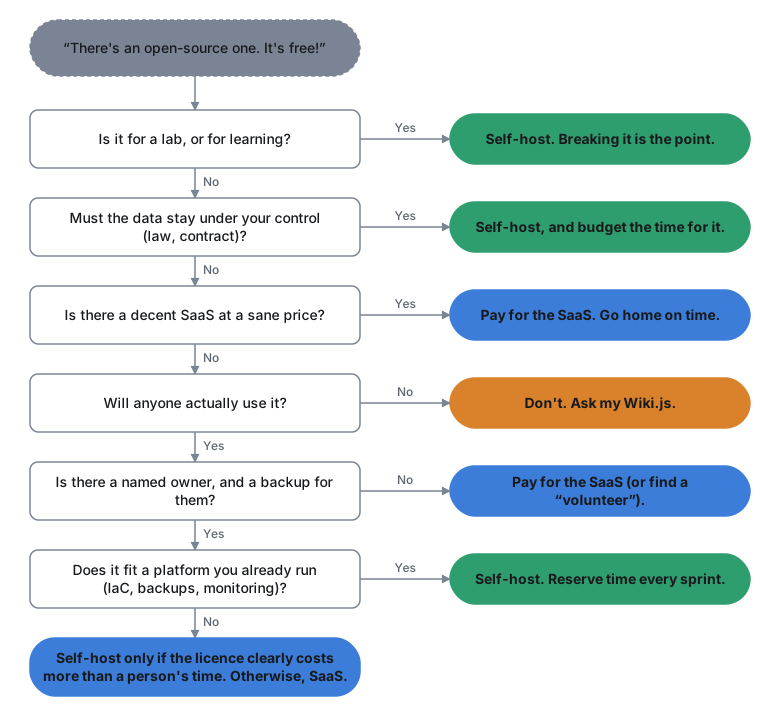
In short: host what you cannot buy, what must not leave, or what your platform already carries almost for free.
When it is not
- A good, reasonably priced SaaS exists.
- Nobody on the team wants to own it long term.
- The tool is critical, and your team cannot offer 24/7 support for it.
- The main argument is “it’s free”.
- It stores highly sensitive data. A self-hosted password manager like Vaultwarden is a good example: the software is good, but every vault of the company now depends on how well you patch, monitor and back up that one server. Sometimes the risk is simply not worth it.
The short version, as a flowchart
A quick decision checklist
- What does the SaaS cost per year, honestly, for the plan you need?
- How many hours per month will self-hosting take, including upgrades and incidents? Multiply by a real hourly cost.
- Who owns it, and who is the backup?
- What happens when it breaks at 3 a.m.?
- Can you get your data out of either option?
- Does the self-hosted option fit into a platform you already run?
- What does the SaaS demand from you in compliance, and what does leaving it cost? A SaaS does not remove risk, it turns it into supplier risk: supplier assessment, contract clauses, data residency and an exit plan (ISO/IEC 27001:2022 Annex A controls 5.19 to 5.23 on supplier relationships and cloud services, TISAX, and the supply chain security measures of NIS2, Article 21).
If the answers to 2 to 4 make you uncomfortable, pay for the SaaS.
Closing
Self-hosting is not free; it just sends the bill to a different place. When you host something, keeping its infrastructure secure, patched and monitored is your responsibility, every week, for as long as it runs. Sometimes that place is the right one: niche tools, very expensive ones, strict data requirements, or a platform where one more app costs little. Most of the time, though, the cheapest tool is the one somebody else maintains.
Sources