blog / · updated · 7 min read
Landing in an Unknown Infrastructure: A Field Guide to the First 30 Days
You have just joined a company and nobody can tell you what runs where. How to explore an unfamiliar estate without breaking anything, and how to turn what you find into a plan.
Every IT lead has lived this moment: first week in a new job, admin credentials in hand, and a growing suspicion that nobody fully knows what the company runs. The documentation is three years old, the person who built half of it left, and there is a server in a cupboard that everyone is afraid to reboot.
I’ve been in this situation several times by now. A new workplace, racks full of disconnected hardware, a furball of network cables, switches running firmware so old it could legally emancipate, and that Raspberry Pi nobody knows the purpose of. And that’s just the physical layer; we haven’t even started on the cloud.
This is the approach I use for the first 30 days. It is not about fixing things. It is about understanding them well enough to decide what to fix first.
Rule zero: observe before you touch
In the first weeks your biggest risk is not an attacker. It is you, changing something you do not understand. Read-only access first, changes later, and every change you do make goes through whatever change process exists (or the one you are about to create).
Week 1: people and paper
Technology is the easy part. Start with the people who know where the bodies are buried.
- Talk to everyone who touches IT: your team, the previous admin if reachable, finance (they know every subscription), HR (they know joiners and leavers), and the most senior developer.
- Ask the same three questions: What breaks most often? What are you afraid of? What would you change first?
- Collect what exists: diagrams, wikis, password vaults, contracts, the last audit report, the risk register.
- Backups. Do they exist, do they run, and has anyone ever restored one?
Week 2: discovery
Now build your own picture, independent of what people told you.
- Identity first. Export users, groups and admin roles from your identity provider. Who has global admin? How many accounts are disabled but still licensed?
- Endpoints. What does your MDM or EDR see? Compare it with the hardware inventory and HR’s headcount. The gaps are interesting.
- Network. Scan your own ranges (with permission and announced): what is listening, what is exposed to the internet, what has no owner.
- Cloud. List every subscription and account, every public IP, every storage bucket. Look at the bill grouped by service.
- SaaS. Sign-in logs and expense data will show you more apps than any questionnaire.
- Find the money: invoices and card statements reveal SaaS tools and cloud accounts nobody mentioned.
The toolkit I actually use
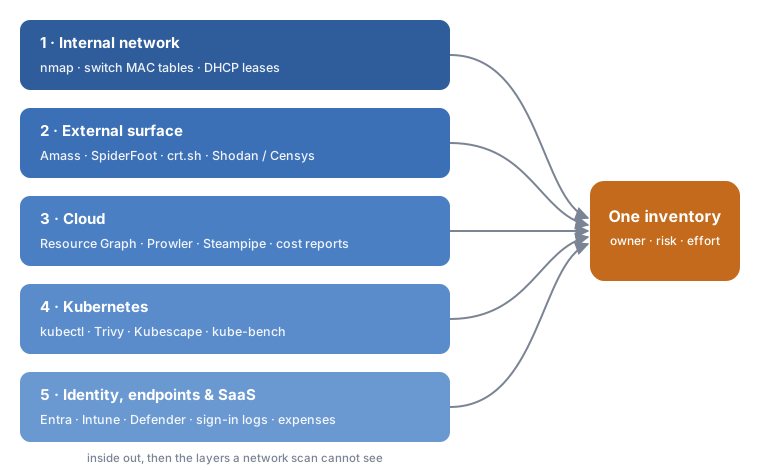
I go from the inside out, then to the layers a network scan cannot see. Every scan is announced and authorised first: being the new person is not a reason to trigger the SOC.
1. Internal network: what is actually there
Start with what is plugged in. A ping sweep first, then a service scan of what answered.
# Host discovery, then services on the live hosts
nmap -sn 10.0.0.0/16 -oA sweep
nmap -sV --top-ports 1000 -iL live-hosts.txt -oA services
Compare the results with the switch MAC tables and the DHCP leases. Anything that answers and is not in any inventory goes straight to the “who owns this?” list. That is usually where that Raspberry Pi shows up.
2. External surface: what the internet sees
Then look at the company the way an attacker would: domains, subdomains, exposed services and leaked information, all from public sources.
# Passive subdomain enumeration
amass enum -passive -d example.com -o amass.txt

# OSINT sweep: DNS, certificates, leaks, exposed services
python3 sf.py -s example.com -u passive -o csv > spiderfoot.csv
Certificate transparency logs (crt.sh) and Shodan or Censys complete the picture. Forgotten subdomains pointing to dead cloud resources are a classic finding, and a takeover waiting to happen.
3. Cloud: inventory first, posture second
Enumerate every subscription and account, then check how they are configured.
// Azure Resource Graph: every public IP and what it is attached to
resources
| where type == "microsoft.network/publicipaddresses"
| project name, resourceGroup, subscriptionId, ip = properties.ipAddress, attachedTo = tostring(properties.ipConfiguration.id)
# Posture checks against CIS and other benchmarks
prowler azure --az-cli-auth
prowler aws
For multi-cloud inventory queries, Steampipe or CloudQuery let you query resources with SQL. Do not forget the bill: cost reports grouped by service reveal resources nobody mentioned.
4. Kubernetes: the cluster inside the cloud
Clusters hide a whole second infrastructure: workloads, service accounts, secrets and ingress rules.
kubectl get nodes,namespaces,ingress -A
kubectl get clusterrolebindings -o wide        # who is cluster-admin?
trivy k8s --report summary                      # vulnerabilities and misconfigurations
kubescape scan                                  # posture against NSA/CISA and CIS
kube-bench checks the nodes against the CIS Kubernetes Benchmark, if you can run it as a job on the cluster.
5. Identity, endpoints and SaaS
The remaining layers come from consoles you already have: privileged roles and stale accounts in Entra, unenrolled or out-of-support devices in Intune and Defender, and shadow IT in the sign-in logs and expense reports.
Everything goes into one place, even if it starts as a spreadsheet.
Week 3: map and score
Put everything in one place, even if it is a spreadsheet. For each finding, note:
| Field | Example |
|---|---|
| What | Global admin account with no MFA |
| Impact if it goes wrong | Full tenant compromise |
| Likelihood | High (exposed to password spraying) |
| Effort to fix | Low |
| Owner | IT |
Score impact and likelihood from 1 to 3, multiply, and sort. Then look at effort. That gives you three groups:
- Quick wins: high risk, low effort. Do them in the first month.
- Projects: high risk, high effort. They go to the roadmap with a business case.
- Accepted for now: low risk. Document the decision so it is not forgotten.
Week 4: report and plan
Write a short report for management. Not a list of everything that is wrong (that reads as an attack on your predecessor and on the people who stayed), but:
- What we have (a one-page map).
- The top five risks in business language.
- What I have already fixed.
- What I propose for the next quarter, with effort and cost.
Things I learned the hard way
1. Do the full reconnaissance before you touch anything. The urge to fix the first scary thing you see is strong. Resist it. A partial picture leads to confident decisions on wrong assumptions: the “unused” server you switch off turns out to be the licence server for half the company. Finish the enumeration first, then decide.
2. Find the backups before you need them. Not “is there a backup product?”, but where the backups are, what they cover, whether the jobs actually succeed, and when someone last restored anything. Until you know you can recover, every change you make is a bet.
3. Document, document, document. Everything you find goes somewhere persistent and searchable the same day, not into your head or a notebook. An inventory tool such as GLPI is ideal for this: assets, network devices, software, licences, contracts and who owns what, all in one place and linked together. A spreadsheet is fine on day one; it is not fine on day ninety.
The order matters: enumerate first, document second, and only then start putting out fires. You cannot fix what you do not know exists.
Closing
Your first month in a new infrastructure sets the tone for everything after. Spend it listening, mapping and writing things down. The fixing will come, and it will go much better because you know exactly where you are standing.
Sources
- CIS Critical Security Controls v8: Control 1 (Inventory and Control of Enterprise Assets) and Control 2 (Inventory and Control of Software Assets)
- ISO/IEC 27001:2022, Annex A control 5.9: Inventory of information and other associated assets
- GLPI Project